Choose the Right Sage Hosting Provider: Selection Tips
Published November 20, 2025
Picking your Sage hosting provider isn’t something you want to rush. Your ERP system connects every piece of your business, from accounting to inventory to customer relationships. The hosting partner you choose determines whether your team can work efficiently or struggles with lag, downtime, and support issues.
Gotomyerp has been handling cloud hosting for Sage and QuickBooks since 2005. We’ve seen what works and what doesn’t. Here’s what you should know before making your decision.
What Sage Cloud Hosting Actually Means
Sage cloud hosting takes your desktop ERP software and moves it to virtual servers. Your team accesses Sage 50, Sage 100, or Sage 300 via secure internet connections rather than maintaining physical servers in your office. Most companies find that this arrangement significantly reduces their IT headaches.
You pay monthly fees based on your usage. Physical hardware maintenance, security patches, and system updates typically get handled by your provider. The model works well for businesses tired of unexpected hardware failures and capital expenditures.
Why This Decision Matters More Than You Think
Hosting companies vary wildly in what they deliver. Some specialize in Sage configurations and understand the software inside and out. Others offer generic cloud infrastructure that might work fine for basic needs, but falls short when you need integration support or troubleshooting.
Your provider becomes part of your IT team. They manage business-critical applications and sensitive financial data. That’s not something you hand over to just anyone.
What to Look for in a Provider
Security That Actually Protects Your Data
Security forms the non-negotiable foundation of reliable hosting. Data centers should maintain multiple defensive layers: firewalls, intrusion detection, and encryption protocols working together. Organizations typically evaluate third-party providers against compliance standards such as SSAE 18 and SOC 2, which help companies verify that appropriate controls are in place to protect customer data.
Ask potential providers about their audit results. Review their certifications. Verify they conduct regular penetration testing. Strong security practices reduce the risk to your client’s information and financial records.
Uptime and Performance Numbers That Hold Up
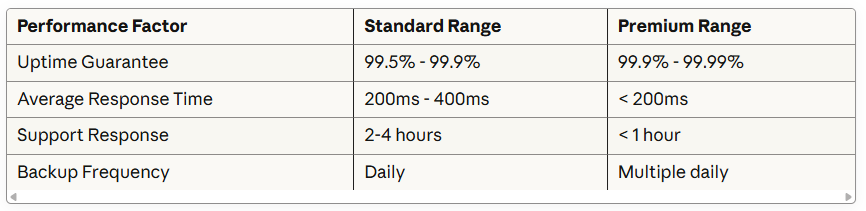
Provider Performance Comparison
Disclaimer: These figures represent approximate industry ranges based on typical provider offerings as of 2025. Individual provider performance varies. Always request specific SLA documentation and recent performance history from your shortlisted vendors before finalizing decisions.
Downtime messes with operations and frustrates everyone. Look for providers offering 99.9% or higher uptime guarantees, which translates to potentially less than nine hours of downtime annually.
Raw uptime numbers don’t tell the whole story, though. Server response times, processing speeds, and network latency all affect your daily experience. Providers using SSD storage and robust infrastructure generally deliver faster performance.
Support That Knows Sage
Technical problems don’t respect business hours. Your hosting partner should offer 24/7 support through phone, chat, and ticketing systems. Response times separate adequate providers from exceptional ones.
Test their support during evaluation. Submit questions and note how quickly and thoroughly they respond. Ask about their Sage-specific expertise. Generic cloud support teams might struggle with Sage configurations, third-party add-ons, and industry-specific requirements.
Real Sage Experience
Generic cloud providers often lack deep Sage knowledge. Sage cloud hosting specialists understand platform architecture, common integration points, and industry-specific add-ons your business might need.
Verify that providers support your Sage version and any ISV applications you currently use. They should facilitate integration with CRM systems, payment processors, and custom tools without excessive friction.
Room to Grow
Business expansion shouldn’t mean infrastructure headaches. Your hosting solution should scale resources as needs shift—storage capacity, processing power, and user licenses adjusting smoothly.
Flexible providers offer customizable plans without rigid contracts. Look for pay-as-you-grow models that accommodate seasonal fluctuations or expansion phases. This approach helps control costs while maintaining adequate resources.
Clear Pricing Without Surprises
Hidden fees destroy budget planning. Quality providers present clear pricing structures covering hosting, maintenance, support, and backups. Review contracts carefully for setup costs, termination fees, and overage charges.
Compare the total cost of ownership across multiple providers. The cheapest option rarely delivers optimal value in the long term. Balance pricing against performance guarantees, support quality, and included features.
Understanding Migration
Typical Migration Timeline
Disclaimer: Migration timelines shown represent general scenarios. Actual duration depends heavily on your data volume, system complexity, customizations, and business-specific requirements. Consult with your chosen provider for customized project estimates tailored to your situation.
Migration complexity often varies with factors such as data volume and system configurations, making early planning essential to avoid project delays. According to enterprise software research, successful ERP migrations are rooted in well-defined goals, realistic timelines, and proper resource allocation. Experienced providers guide you through assessment, setup, transfer, and testing phases. They work to minimize disruption by scheduling migrations during low-activity periods when possible.
Request a detailed migration plan before committing. Understanding each phase, potential challenges, and contingency procedures helps prevent unexpected complications. Industry research shows that migration plans should outline the scope, timeline, resources, and responsibilities, identify critical data, and define clear goals for successful outcomes.
Warning Signs to Watch For
Certain red flags indicate providers you should probably avoid:
Refusing to share security audit results or compliance certifications
Offering vague uptime guarantees without proper SLA documentation
Lacking demonstrable Sage-specific expertise or relevant case studies
Imposing long-term contracts without reasonable trial periods
Displaying poor communication during the sales process
Showing consistent negative review patterns about support responsiveness
Trust your instincts during provider evaluation. If answers seem evasive or something feels off, keep looking.
Making Your Final Choice
Create a comparison spreadsheet listing your top three candidates. Score each provider against your priority criteria: security, performance, support, expertise, and pricing. This structured approach clarifies which option best fits your specific situation.
Request references from clients in similar industries. Ask about their experiences with migrations, ongoing support, and any challenges they’ve encountered. Real-world insights reveal how providers perform beyond their marketing materials.
Consider trial periods or pilot programs when available. Testing services firsthand reduces uncertainty and validates provider capabilities before full commitment.
Thinking Long-Term
Your hosting relationship extends well beyond initial setup. Evaluate how providers handle software updates, security patches, and infrastructure improvements. Proactive partners anticipate needs and recommend optimizations rather than just reacting to problems.
Review contract renewal terms and pricing adjustments carefully. Understand escalation procedures for major issues. Strong partnerships typically include regular check-ins, performance reviews, and strategic planning discussions.
Frequently Asked Questions
Q: How long does a typical Sage hosting migration take? A: Migration timelines commonly range from 4-8 weeks, depending on your data complexity and customizations. Simpler configurations can be completed in 2-3 weeks, while enterprise systems with extensive integrations can take longer.
Q: Can I switch providers if I’m unhappy with the current service? A: Yes, though the process varies by provider and contract terms. Review your agreement for termination clauses and data portability guarantees. Reputable providers should facilitate reasonable transitions without holding your data hostage.
Q: What happens to my data if the hosting provider goes out of business? A: Quality providers maintain business continuity plans and data escrow arrangements for such scenarios. Ask about these protections during evaluation. Your contract should specify data return procedures and backup access.
Q: Do I need to upgrade my Sage version before migrating to cloud hosting? A: Not necessarily, though newer versions often provide enhanced cloud functionality. Discuss your current version with potential providers to understand compatibility and possible optimization opportunities.
Q: How do cloud hosting costs typically compare to maintaining on-premise servers? A: Cloud hosting often reduces the total cost of ownership by eliminating hardware purchases, ongoing maintenance expenses, and dedicated IT staff requirements. Monthly fees offer more predictable budgeting compared to capital expenditures and variable maintenance costs.
Q: What security measures generally protect data in the cloud? A: Enterprise cloud providers typically undergo rigorous third-party audits and maintain security controls covering areas like system security, availability, processing integrity, and confidentiality. Reputable data centers employ physical security, redundant power systems, and disaster recovery capabilities that often exceed those of typical on-premises setups.
Ready to Explore Your Options?
Selecting the right Sage hosting provider protects your business operations and supports your growth objectives. Focus on providers with demonstrated Sage expertise, strong security practices, reliable performance metrics, and responsive support teams.
Ready to explore cloud hosting options for your Sage environment? Get a free quote from specialists who understand your specific needs. There’s no obligation whatsoever, and you’ll receive customized recommendations based on your exact requirements and business situation.
Picking your Sage hosting provider isn't something you want to rush. Your ERP system connects every piece of your business, from accounting to inventory to customer relationships. The hosting partner you choose determines whether your team can work efficiently or struggles with lag, downtime, and support issues.
Running a business on cloud accounting software means your security setup becomes the backbone of everything you do. Companies moving to platforms like gotomyerp need to grasp what protection features actually matter—it’s the line between smooth sailing and a data nightmare.
Picking an enterprise resource planning system feels overwhelming when you're staring at all the options. If you're exploring modern accounting solutions, gotomyerp offers specialized expertise in cloud hosting that matches what your business actually needs. Here's the thing: both SaaS and cloud ERP run through remote servers, but they work differently in ways that matter for your daily operations and bottom line.