

Executive Summary
QuickBooks is the first accounting system many small businesses trust. It is affordable, familiar, and quick to set up. Over time, many SMBs outgrow QuickBooks as they add users, entities, locations, or complex revenue.
The strain tends to surface at month-end first. Spreadsheets start carrying work the software was never built to handle. That is often the right moment to evaluate an upgrade to Sage ERP.
This guide covers the common warning signs, Intuit’s published plan limits, and how to judge timing. It also explains where Sage Intacct, Sage 100, and Sage 300 may fit next.
5 Key Takeaways
- User caps can arrive sooner than expected. QuickBooks Online Plus supports up to 5 billable users, while Advanced tops out at 25 [1].
- Desktop choices have narrowed. Intuit stopped selling several Desktop editions to new U.S. subscribers after September 30, 2024 [2].
- Close time is a practical signal. APQC reports a cross-industry median of 6.0 calendar days for monthly consolidated statements [3].
- Multiple entities change the equation. Sage Intacct is designed to automate consolidations from one shared environment [4].
- Planning protects the payoff. Gartner expects many recent ERP initiatives to fall short of their original business case [5].
Why QuickBooks Works So Well at First
QuickBooks earns its place in early-stage finance. Bank feeds, invoicing, and standard reports cover most single-entity needs. Plenty of owners run it for years without serious issues.
According to the SBA Office of Advocacy, the United States has more than 36 million small businesses [6]. Most begin with simple books and a handful of users. As a company grows, its finance requirements grow with it.
At CFO Tech, we support both QuickBooks and Sage environments every day. That gives us a close view of where QuickBooks shines and when companies start to outgrow QuickBooks.
What Are the Signs You Have Outgrown QuickBooks?
Most growing companies notice several of these signs at once. One sign alone may not justify a move. Three or more usually deserve a closer look.
- You keep hitting user limits. Intuit’s QuickBooks Online plan details list 3 billable users for Essentials and 5 for Plus [1].
- Lists and files feel heavy. Intuit’s Desktop Enterprise comparison page shows Pro and Premier limited to 5 users and 14,999 list entries [7].
- Entities live in separate files. Consolidation then happens in spreadsheets, along with manual intercompany eliminations.
- The close keeps stretching. A close that runs well beyond the APQC median of 6.0 calendar days may point to system gaps [3].
- Your chart of accounts is crowded. Simple Start, Essentials, and Plus allow up to 250 accounts, with 40 combined classes and locations in Plus [1].
- Revenue rules are getting complex. Subscriptions, milestones, and deferred revenue can push key calculations outside the ledger. The SBA notes that accrual accounting is more complex to manage than the cash method [8].
- Audit and lender requests take days. The IRS explains that good records support financial statements and items reported on tax returns [9]. Thin approval trails can make that support harder to produce.
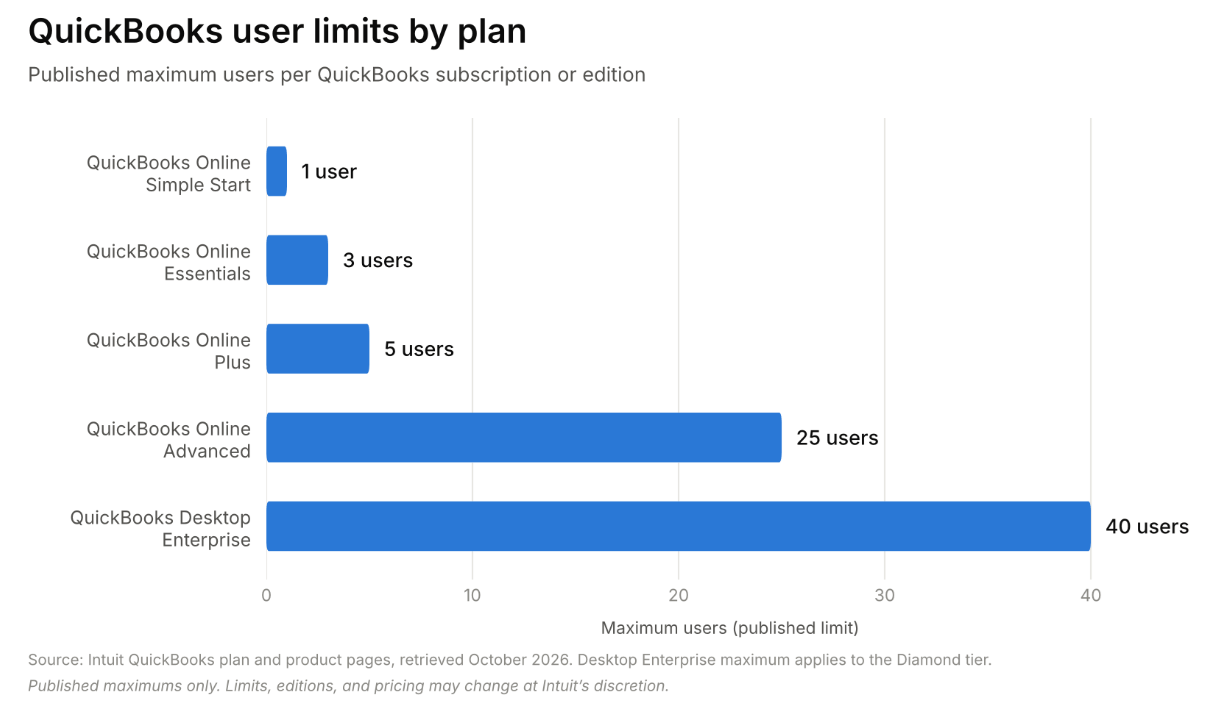
Source: Intuit QuickBooks plan and product pages, retrieved October 2026 [1] [7]. Figures reflect published maximums at the time of writing. Plan limits, editions, and pricing may change at Intuit’s discretion.
The Desktop Path Has Changed Too
Intuit stopped selling new subscriptions of Desktop Pro Plus, Premier Plus, and Mac Plus to new U.S. customers after September 30, 2024 [2]. According to Intuit’s Desktop announcement, existing subscribers can still renew, and Desktop Enterprise remains available. For many teams, that turns the next move into a planning question with time to choose well.
When Is the Right Time to Upgrade to Sage ERP?
The best time is usually before a hard deadline forces the decision. Rushed migrations tend to carry old problems into a new system. A calm evaluation gives you room to fix processes first.
Trigger Events Worth Watching
- A new entity, location, or acquisition is planned within the next 6 to 12 months.
- An audit, loan covenant, or investor reporting requirement is approaching.
- Finance headcount keeps rising just to keep pace with transaction volume.
- A QuickBooks renewal or version change is coming up on your calendar.
Line Up the Move With Your Fiscal Calendar
Many teams target a go-live at the start of a fiscal year or quarter. Clean cutover dates can simplify opening balances and year-over-year comparisons. The chart below shows how manual consolidation may stretch the close as entities are added.
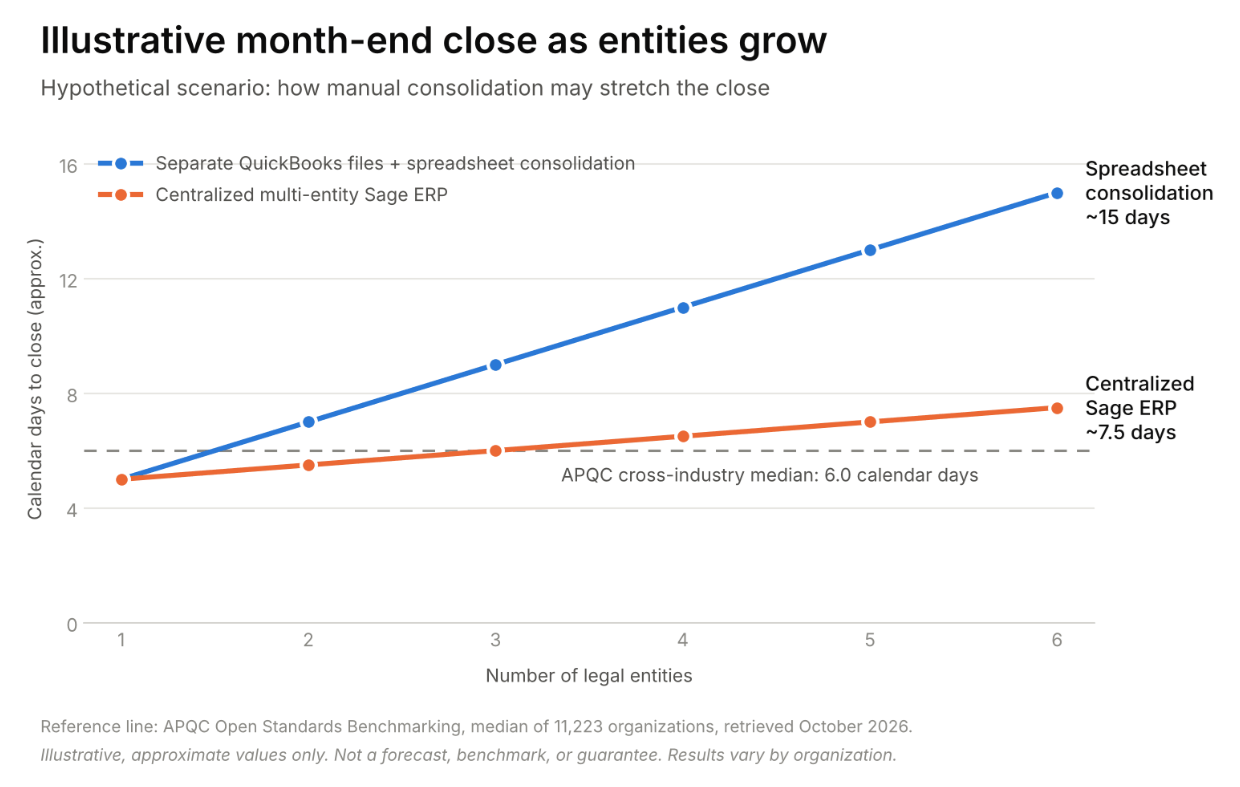
Disclaimer: Hypothetical scenario with approximate values, shown for illustration only. It is not a forecast, benchmark, or promised result. Actual close times may vary, and the APQC median line is a cross-industry reference [3].
Which Sage ERP Fits Your Next Stage?
Sage offers more than one path, and the right fit depends on how you operate. The options below give you a simple starting framework.
Sage Intacct for Multi-Entity, Cloud-First Finance
Cloud financial management platform Sage Intacct often suits services, SaaS, nonprofit, and multi-entity organizations. Sage describes automated consolidations and self-balancing inter-entity transactions managed from one shared environment [4]. This can reduce the spreadsheet work that slows a multi-entity close.
Sage also points to multi-dimensional reporting and built-in support for GAAP and ASC 606 [10]. The company further states that Sage Intacct is the AICPA’s only preferred provider of financial applications [10].
Sage 100 for Distribution and Light Manufacturing
Sage 100 may suit companies where inventory, order entry, and job costing drive daily operations. Many teams run it in a hosted cloud environment to keep familiar workflows while adding remote access.
Sage 300 for Multi-Currency Operations
Sage 300 is often favored by companies with international subsidiaries due to its robust features. Specifically, it is designed for managing multi-entity operations, multi-currency accounting, and inventory control [4]. This positions Sage as a strong choice for organizations looking to streamline their financial processes across various locations.
Not Ready Yet? Extend Your Runway
Some companies are still a year or more away from ERP. QuickBooks Desktop Enterprise can scale to as many as 40 users [7]. Hosting it in a managed cloud may buy time while you plan the bigger move.
How Do You Move From QuickBooks to Sage Without Disrupting Operations?
Gartner predicts over 70% of recent ERP initiatives will not fully meet original business case goals by 2027 [5]. Clear scope and clean data can help you avoid becoming part of that statistic. A phased plan often works best.
- Document pain points and goals. List the reports, workflows, and controls the new system must support.
- Clean your data first. Merge duplicate customers and vendors, and retire stale items before migration.
- Design your structure. Map entities, dimensions, and a standardized chart of accounts.
- Run a parallel close. Compare one or two periods side by side before full cutover.
- Train by role. Short, role-based sessions can support adoption better than one long training day.
Frequently Asked Questions
How do I know if my business has outgrown QuickBooks?
Look for user caps, slow files, spreadsheet consolidations, and a lengthening close. If several apply at once, a formal evaluation is worthwhile.
Can QuickBooks handle multiple entities?
Standard QuickBooks plans typically use a separate company file or subscription for each entity. Consolidated reporting often relies on spreadsheets or add-on tools. Sage Intacct is designed to consolidate entities inside one system [4].
Is Sage Intacct a good fit for small businesses?
It can be, especially for growing companies with multiple entities or detailed reporting needs. Very small single-entity businesses may find QuickBooks sufficient for now.
How long does a QuickBooks to Sage migration take?
Timelines depend on data volume, entity count, and integrations. Simpler projects may take a few weeks, while complex ones can run several months.
Will we lose our QuickBooks history?
Many teams migrate opening balances plus a defined window of transaction history. Older detail can often be archived for audits and reference.
Take a Free Test Drive Before You Decide
When SMBs outgrow QuickBooks, the pressure usually builds quietly, one workaround at a time. You can still choose your next platform on your own schedule. A guided demo can show how your reports and workflows might look in Sage.
The CFO Tech team can walk you through realistic scenarios based on how your business runs today. Request your free test drive and see what your next stage could look like.
Key References and Sources
- Source [1]: Intuit QuickBooks. (2026). “QuickBooks Online Subscription Levels.” Retrieved from https://quickbooks.intuit.com/subscription/
- Source [2]: Intuit QuickBooks. (2024). “QuickBooks Desktop to Stop Selling to New U.S. Subscribers.” Retrieved from https://quickbooks.intuit.com/r/whats-new/quickbooks-desktop-stop-sell/
- Source [3]: APQC. (2026). “Cycle Time in Days to Complete the Monthly Consolidated Financial Statements.” Retrieved from https://www.apqc.org/resources/benchmarking/open-standards-benchmarking/measures/cycle-time-days-complete-monthly
- Source [4]: Sage. (2026). “Sage Intacct Multi-Entity Software.” Retrieved from https://www.sage.com/en-us/sage-business-cloud/intacct/product-capabilities/core-financials/multi-entity/
- Source [5]: Gartner. (2026). “Enterprise Resource Planning to Optimize Operations.” Retrieved from https://www.gartner.com/en/information-technology/topics/enterprise-resource-planning
- Source [6]: U.S. Small Business Administration, Office of Advocacy. (2026). “Advocacy Releases Frequently Asked Questions About Small Businesses 2026.” Retrieved from https://advocacy.sba.gov/2026/02/03/advocacy-releases-frequently-asked-questions-about-small-businesses-2026/
- Source [7]: Intuit QuickBooks. (2026). “Compare QuickBooks Desktop Enterprise with Desktop Pro and Premier.” Retrieved from https://quickbooks.intuit.com/desktop/enterprise/compare-pro-premier-to-enterprise/
- Source [8]: U.S. Small Business Administration. (2026). “Manage Your Business.” Retrieved from https://www.sba.gov/counseling/manage-your-business/
- Source [9]: Internal Revenue Service. (2026). “Recordkeeping.” Retrieved from https://www.irs.gov/businesses/small-businesses-self-employed/recordkeeping
- Source [10]: Sage. (2026). “Sage Intacct vs QuickBooks: The Smarter Choice for Growing Businesses.” Retrieved from https://www.sage.com/en-us/sage-business-cloud/intacct/switch-to-sage/quickbooks-alternative/
Disclaimer: This article is for general informational purposes only. It does not constitute legal, tax, accounting, or financial advice. Product features, user limits, pricing, and availability reflect public information at the time of writing. These details may change without notice. Any timelines or efficiency outcomes described are illustrative and not guaranteed. QuickBooks and Intuit are trademarks of Intuit Inc. Sage, Sage Intacct, Sage 100, and Sage 300 are trademarks of The Sage Group plc or its licensors. Please consult a qualified professional before making software, accounting, or tax decisions.