In today’s digital landscape, protecting your critical business data isn’t just important—it’s essential for survival. When you’re running Sage accounting software that houses your company’s financial backbone, implementing robust backup strategies becomes your first line of defense against potential data disasters. Whether you’re managing payroll, tracking inventory, or processing transactions, a single data loss event could potentially disrupt operations for days or even weeks.
At gotomyerp, we’ve helped thousands of businesses transition to secure cloud-based hosting solutions. Through our experience, we’ve identified the most effective backup strategies that could safeguard your Sage environment. This comprehensive guide explores proven methods that may help protect your valuable business information and ensure continuity when unexpected challenges arise.
Understanding Sage Data Vulnerability
Your Sage system contains irreplaceable business data that grows more valuable every day. From customer records and vendor information to financial transactions and historical reports, this information represents years of business operations that would be nearly impossible to recreate from memory.
Common threats that could potentially compromise your Sage data include:
Hardware Failures: Server crashes, complex drive malfunctions, and equipment aging can lead to sudden data loss. Statistics suggest that hardware failures account for approximately 40% of data loss incidents in business environments.
Human Error: Accidental deletions, incorrect data entry, or improper system maintenance procedures could result in significant data corruption or loss.
Cybersecurity Threats: Ransomware attacks, malware infections, and unauthorized access attempts continue to evolve, potentially targeting accounting systems that contain sensitive financial information. According to the National Institute of Standards and Technology (NIST), “Data loss incidents—whether a ransomware attack, hardware failure, or accidental or intentional data destruction—can have catastrophic effects” on businesses and their operations.
Natural Disasters: Floods, fires, power outages, and other environmental factors may damage on-premises infrastructure and the data stored within.
The 3-2-1 Backup Rule for Sage Hosting
Professional IT experts often recommend the 3-2-1 backup strategy as a gold standard for data protection. This approach suggests maintaining:
3 copies of your critical data (including the original)
2 different storage media types (such as local drives and cloud storage)
1 off-site backup location for disaster recovery purposes
When applied to Sage hosting environments, this rule could provide multiple layers of protection that significantly reduce the risk of permanent data loss.
Implementation Example
Consider a mid-sized manufacturing company using Sage 100. Their backup strategy might include:
Primary copy: Live Sage database on hosted servers
Local backup: Daily automated backups are stored on a separate server infrastructure
Cloud backup: Weekly encrypted backups are transferred to secure off-site cloud storage
Disclaimer: The scenarios presented are approximate examples based on standard industry practices and may vary depending on specific business requirements and hosting configurations.
Automated vs. Manual Backup Strategies
Automated Backup Solutions
Automated systems offer several potential advantages for Sage hosting environments:
Consistency: Scheduled backups run at predetermined intervals without requiring manual intervention, potentially reducing the risk of missed backup windows.
Reduced Human Error: Automation eliminates the possibility of forgetting to initiate backups or making mistakes during the backup process.
Resource Efficiency: Automated systems can potentially perform backups during off-peak hours, minimizing impact on daily operations.
Manual Backup Considerations
While automation offers convenience, manual backups might still play a role in comprehensive strategies:
Critical Milestone Protection: Before major system updates, month-end processes, or significant data imports, manual backups could provide additional security.
Verification Purposes: Periodic manual backups allow IT administrators to verify that automated systems are functioning correctly.
Cloud-Based Backup Solutions
Cloud hosting environments offer unique backup opportunities that traditional on-premises systems may not provide:
Geographic Redundancy
Cloud providers typically maintain data centers across multiple geographic regions. This distribution could help ensure that even if one location experiences issues, your backup data remains accessible from alternative locations.
Scalable Storage Options
Cloud-based backup solutions often provide flexible storage capacities that can grow with your business needs, potentially eliminating concerns about running out of backup space.
Enhanced Security Features
Professional cloud hosting providers implement enterprise-grade security measures, including encryption protocols, access controls, and monitoring systems that may exceed what individual businesses could implement independently.
Real-Time vs. Scheduled Backups
Real-Time Backup Benefits
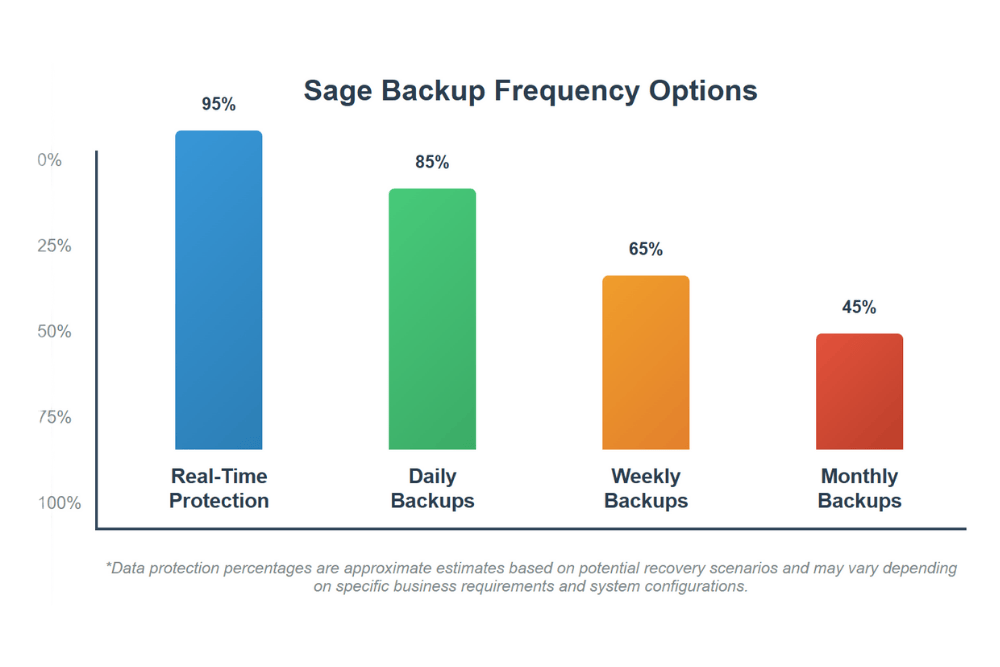
Real-time or continuous data protection systems create backup copies as changes occur within your Sage system. This approach could potentially minimize data loss in emergencies, as the most recent transactions and updates are immediately preserved.
Scheduled Backup Advantages
Traditional scheduled backups offer several benefits:
Predictable Resource Usage: Backups occur during designated time windows, allowing for better resource planning and system performance optimization.
Simplified Management: Scheduled systems are often easier to monitor and troubleshoot compared to continuous backup solutions.
Cost Effectiveness: Many businesses find that nightly or weekly backups provide adequate protection while potentially reducing storage and bandwidth costs.
Testing and Verification Procedures
Creating backups represents only half of an effective strategy—regular testing ensures that your backup data remains viable and restorable when needed.
Monthly Restoration Tests
Consider implementing monthly procedures to restore backup data to test environments. This process helps verify that:
Backup files are complete and uncorrupted
Restoration procedures work as expected
Recovery time objectives can be met
Staff members understand restoration processes
Documentation Requirements
Maintain detailed documentation that includes:
Backup schedules and procedures
Storage locations and access credentials
Recovery procedures and contact information
Testing results and identified issues
Compliance and Regulatory Considerations
Many industries have specific requirements regarding data retention and backup procedures. Your Sage backup strategy should align with relevant regulations such as:
Financial Industry Standards: Banking and finance sectors often require specific data retention periods and security measures.
Healthcare Compliance: HIPAA regulations may apply if your business processes healthcare-related financial information.
Tax Requirements: The IRS and state tax authorities typically require businesses to maintain financial records for specified periods.
Disaster Recovery Planning
Effective backup strategies extend beyond simple data storage to encompass comprehensive disaster recovery planning. The U.S. Small Business Administration emphasizes that “Statistics say that 25% of businesses won’t open again after a disaster,” making proper preparation crucial for business survival.
Recovery Time Objectives (RTO)
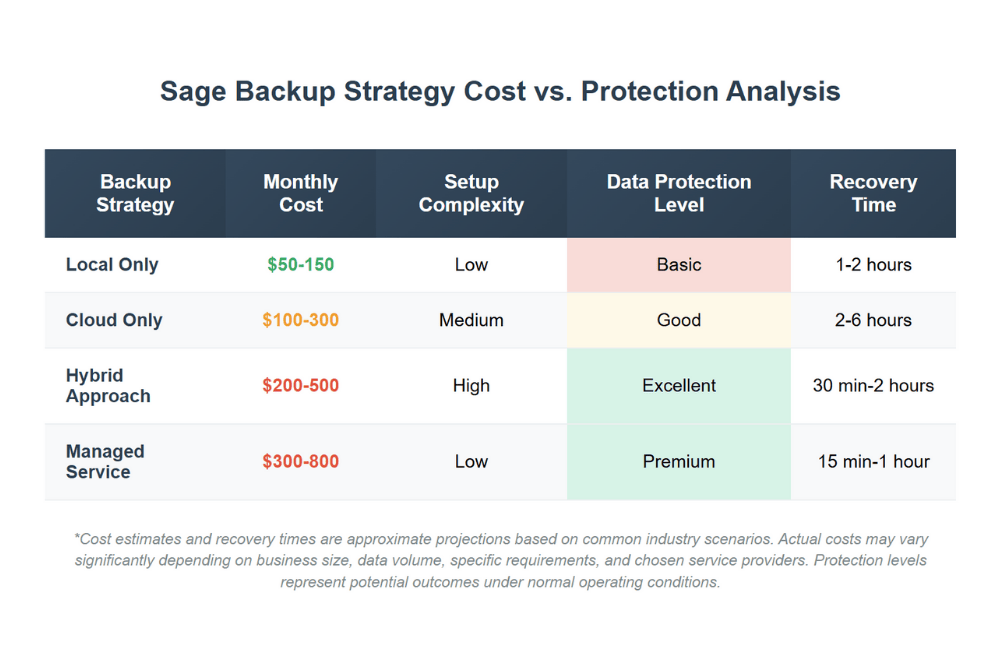
Determine how quickly your business needs to restore Sage functionality after an incident. Different backup methods offer varying recovery timeframes:
Local backups: Potentially faster restoration, but limited to local disaster scenarios
Cloud backups: May require additional time for data transfer, but protect against local disasters
Hybrid approaches: Could offer balanced recovery options with multiple restoration pathways
Business Continuity Planning
Consider how the Sage system downtime might affect various business operations. The Ready.gov IT Disaster Recovery Plan provides additional guidance on comprehensive recovery planning that extends beyond data backup to include complete operational restoration.
Payroll Processing: Ensure backup strategies support timely payroll operations to meet employee payment schedules.
Invoice Generation: Maintain the ability to create and send customer invoices during recovery periods.
Financial Reporting: Preserve access to financial data needed for management decisions and regulatory reporting.
Cost-Benefit Analysis
When evaluating backup strategies, consider both direct costs and potential losses:
Direct Costs
Backup software licensing
Additional storage requirements
Staff time for management and testing
Cloud service subscriptions
Potential Loss Prevention
Avoided downtime costs
Preserved customer relationships
Maintained regulatory compliance
Protected intellectual property value
Disclaimer: Cost projections and potential savings are approximate estimates that may vary significantly based on individual business factors and specific hosting configurations.
Implementation Best Practices
Gradual Rollout Strategy
Consider implementing new backup procedures gradually:
Pilot Testing: Start with non-critical data to test new backup systems
Incremental Expansion: Gradually include additional data types and systems
Full Implementation: Deploy comprehensive backup coverage once testing is complete
Staff Training Requirements
Ensure that relevant team members understand:
Backup system operation and monitoring
Restoration procedures and protocols
Emergency contact information and escalation procedures
Documentation requirements and maintenance
Frequently Asked Questions
How often should I back up my Sage data?
The optimal backup frequency depends on your business activity level and risk tolerance. Many businesses find that daily backups provide adequate protection, while high-transaction environments might benefit from more frequent backup intervals. Consider factors like data entry volume, transaction frequency, and the potential impact of losing different amounts of data.
What’s the difference between Sage backup files and database backups?
Sage backup files are created using the software’s built-in backup utilities and contain application-specific formatting. Database backups copy the underlying SQL database structure. Many experts suggest using Sage’s native backup features for optimal compatibility during restoration processes.
How long should I retain backup copies?
Retention periods often depend on regulatory requirements, business needs, and storage capacity. Common approaches include keeping daily backups for 30 days, weekly backups for 12 weeks, and monthly backups for one year. Some businesses maintain yearly archive copies for longer-term reference.
Can I test my backups without affecting my live Sage system?
Yes, most backup testing should occur in isolated test environments that don’t connect to your production Sage system. This approach allows you to verify backup integrity and practice restoration procedures without risking disruption to daily operations.
What should I do if I discover my backups are corrupted?
If you identify backup corruption issues, immediately create new backup copies using alternative methods while investigating the root cause. Review backup logs, check storage media integrity, and consider consulting with hosting professionals to identify and resolve underlying problems.
How do cloud-based backups compare to local backup solutions?
Cloud backups often provide geographic redundancy and professional-grade security features, while local backups may offer faster restoration times and greater control over access. Many businesses implement hybrid approaches that combine both methods for comprehensive protection.
Conclusion
Protecting your Sage data through comprehensive backup strategies represents one of the most important investments you can make in your business’s future. The methods outlined in this guide could help safeguard your valuable financial information and ensure business continuity when unexpected challenges arise.
Remember that effective backup implementation requires ongoing attention, regular testing, and periodic strategy updates as your business evolves. By taking proactive steps today, you’re potentially protecting years of business data and ensuring that temporary setbacks don’t become permanent disasters.
Ready to implement professional-grade backup strategies for your Sage hosting environment? Our team of experts can help design and implement comprehensive data protection solutions tailored to your specific business needs. Contact us today for a free consultation to discuss how we can help protect your most valuable business asset—your data.
Picking your Sage hosting provider isn't something you want to rush. Your ERP system connects every piece of your business, from accounting to inventory to customer relationships. The hosting partner you choose determines whether your team can work efficiently or struggles with lag, downtime, and support issues.
Picking an enterprise resource planning system feels overwhelming when you're staring at all the options. If you're exploring modern accounting solutions, gotomyerp offers specialized expertise in cloud hosting that matches what your business actually needs. Here's the thing: both SaaS and cloud ERP run through remote servers, but they work differently in ways that matter for your daily operations and bottom line.
Running a business on cloud accounting software means your security setup becomes the backbone of everything you do. Companies moving to platforms like gotomyerp need to grasp what protection features actually matter—it’s the line between smooth sailing and a data nightmare.