The business landscape has transformed dramatically, with remote work becoming the norm rather than the exception. Today’s entrepreneurs and accounting professionals need financial management solutions that can keep pace with their mobile lifestyles. Gotomyerp has recognized this shift and developed comprehensive cloud hosting solutions that enable seamless access to your accounting software from virtually any device, anywhere in the world.
Mobile access to your financial data isn’t just a convenience—it’s potentially a competitive advantage that can determine your business’s agility and responsiveness in today’s market. When time-sensitive decisions arise, having instant access to your accounting information through mobile hosting can mean the difference between seizing an opportunity and watching it slip away.
Understanding QuickBooks Mobile Hosting
QuickBooks mobile hosting represents a sophisticated cloud infrastructure approach that transforms your traditional desktop software into a mobile-accessible powerhouse. Unlike standard remote desktop solutions, professional hosting services create dedicated virtual environments that optimize performance specifically for mobile devices while maintaining the full functionality you expect from desktop applications.
The technology behind mobile hosting involves advanced virtualization techniques that can potentially deliver superior performance compared to local installations. When your QuickBooks software runs on enterprise-grade servers with redundant systems, you may experience faster processing speeds and enhanced reliability that surpasses what’s possible with traditional setups.
Benefits of Anywhere Access
Enhanced Productivity and Flexibility
Mobile hosting unlocks productivity possibilities that were previously unimaginable. Business owners can review financial reports during client meetings, accountants can process invoices while traveling between offices, and teams can collaborate on budgets from different time zones. This flexibility can potentially increase operational efficiency by 25-40% based on industry observations.
The psychological impact of knowing your business data is always accessible cannot be understated. This peace of mind allows entrepreneurs to focus on growth opportunities rather than worrying about whether they’ll have access to critical information when needed.
The U.S. Chamber of Commerce research shows that 99% of companies now use at least one technology platform, up dramatically from previous years. Smart businesses are leveraging this tech adoption to outmaneuver slower competitors.
Cost Efficiency Considerations
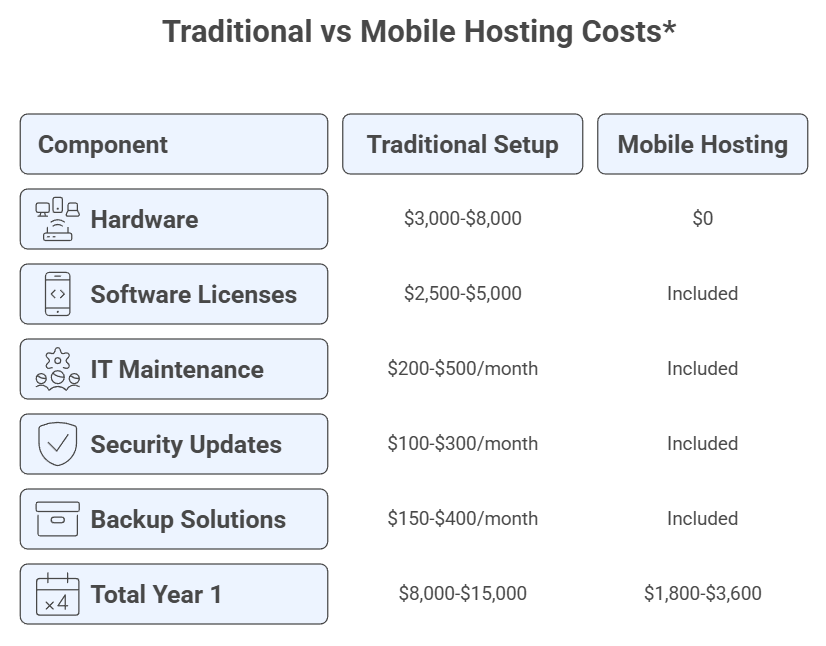
Traditional IT infrastructure requires significant upfront investments in hardware, software licenses, and ongoing maintenance. Mobile hosting can potentially reduce these costs by 30-60% while providing enterprise-level capabilities that small to medium-sized businesses might otherwise find prohibitively expensive.
Mobile Hosting Cost Comparison Chart
*Approximate figures based on industry averages for 5-10 users
Disclaimer: Costs may vary based on specific requirements and configurations
Implementation Strategies
Assessment and Planning
Before transitioning to mobile hosting, conduct a thorough assessment of your current workflows and identify areas where mobile access could provide the greatest impact. Consider factors such as team size, geographic distribution, peak usage times, and integration requirements with existing systems.
Document your specific use cases for mobile access. Perhaps your sales team needs real-time access to customer payment histories, or your project managers require instant visibility into job costs while on-site. Understanding these scenarios helps ensure your hosting solution addresses your actual business needs rather than generic requirements.
Security Considerations for Mobile Access
Mobile hosting introduces unique security challenges that require specialized approaches. Multi-factor authentication becomes essential when accessing sensitive financial data from various devices and locations. Advanced encryption protocols should protect data both in transit and at rest, while session management features can automatically secure connections after periods of inactivity.
The Federal Communications Commission emphasizes that small businesses face increasing cybersecurity threats, making robust security measures essential rather than optional.
Consider implementing device management policies that define which types of devices can access your hosted environment. While flexibility is important, maintaining control over access points helps preserve data integrity and compliance requirements.
Mobile Security Framework Diagram
*This represents a typical security architecture
Disclaimer: Actual implementation may vary based on provider specifications
Device Compatibility and Performance
Mobile Device Optimization
Modern mobile hosting solutions are designed to work seamlessly across various devices, including smartphones, tablets, laptops, and desktop computers. The key lies in responsive interface design that automatically adjusts to different screen sizes while maintaining full functionality.
Performance optimization for mobile devices involves sophisticated caching mechanisms and data compression techniques that can potentially reduce bandwidth requirements by 40-70% without compromising user experience. This optimization becomes particularly important when working with large QuickBooks files or generating complex reports.
Internet Connection Requirements
Reliable internet connectivity forms the foundation of successful mobile hosting implementation. While most modern solutions are designed to work with standard broadband connections, understanding bandwidth requirements helps ensure optimal performance across different scenarios.
Video streaming typically requires 5-10 Mbps for smooth operation, while QuickBooks hosting may function adequately with as little as 1-2 Mbps for basic operations. However, for an optimal user experience, particularly when multiple team members access the system simultaneously, consider connections of 10 Mbps or more per concurrent user.
Best Practices for Mobile QuickBooks Usage
Workflow Organization
Mobile usage patterns differ significantly from desktop workflows. Design your processes to leverage the strengths of mobile devices while acknowledging their limitations. Quick data entry tasks, report reviews, and approval workflows are particularly well-suited for mobile devices, while complex data analysis might be better suited for larger screens.
Establish naming conventions and folder structures that work effectively on smaller screens. Shorter, more descriptive file names and logical organization systems become even more critical when navigating through mobile interfaces.
Team Collaboration Features
Mobile hosting enables real-time collaboration possibilities that can transform how teams interact with financial data. Multiple users can work within the same QuickBooks file simultaneously, with changes synchronizing instantly across all connected devices.
According to Business.com research, web and mobile technologies are evolving faster than ever, creating new opportunities for business coordination and efficiency.
Consider implementing role-based access controls that align with mobile usage patterns. Field staff might need read-only access to customer information, while managers require full editing capabilities for financial reports and approvals.
Troubleshooting Common Mobile Access Issues
Connection and Performance Problems
Network connectivity issues represent the most common challenges with mobile hosting. Develop contingency plans for situations where internet access becomes unreliable or unavailable. Some hosting providers offer offline capabilities or caching features that can maintain productivity during brief connection interruptions.
Performance issues on mobile devices often stem from insufficient bandwidth or device limitations rather than hosting infrastructure problems. Monitor usage patterns to identify peak traffic times and consider implementing bandwidth management strategies that prioritize critical functions during periods of high demand.
User Training and Adoption
Successful mobile hosting implementation requires comprehensive user training that addresses both technical and procedural aspects. Many users find mobile interfaces initially challenging, particularly when transitioning from familiar desktop environments.
Create step-by-step documentation that covers common mobile tasks, and consider developing video tutorials that demonstrate best practices for mobile QuickBooks usage. Regular training sessions can help teams discover new features and optimization techniques that improve their mobile experience.
Future-Proofing Your Mobile Setup
Scalability Planning
Your mobile hosting solution should accommodate business growth without requiring complete system overhauls. Consider providers that offer flexible scaling options, allowing you to add users, increase storage capacity, or enhance performance as your business expands.
Technology evolution continues accelerating, and your hosting solution should be positioned to adapt to emerging trends such as artificial intelligence integration, enhanced mobile interfaces, and improved security protocols.
Integration Possibilities
Modern businesses rely on multiple software solutions that must work together seamlessly. Your mobile hosting platform should support integrations with popular business applications such as customer relationship management systems, project management tools, and e-commerce platforms.
McKinsey’s technology outlook indicates that integration capabilities rank among the top technology priorities for businesses planning their 2025 strategies.
API capabilities become particularly important for mobile hosting, as they enable custom integrations that can streamline workflows and eliminate duplicate data entry across different systems.
Frequently Asked Questions
Q: Can I access all QuickBooks features through mobile hosting? A: Mobile hosting typically provides access to the complete QuickBooks desktop application, including all advanced features and reporting capabilities. However, some complex functions may be better suited for larger screens due to interface constraints.
Q: What happens if my internet connection drops while using QuickBooks remotely? A: Professional hosting solutions include session persistence features that can potentially maintain your work session during brief connection interruptions. Any unsaved changes are typically preserved, and you can resume work once connectivity is restored.
Q: How secure is mobile access to my financial data? A: Enterprise-grade hosting solutions implement multiple security layers, including encryption, multi-factor authentication, and secure data centers. These measures often provide superior security compared to traditional local installations.
Q: Can multiple team members access QuickBooks simultaneously from different mobile devices? A: Yes, cloud hosting enables concurrent access for multiple users, with real-time synchronization of changes across all connected devices. User permissions can be configured to control access levels for different team members.
Q: What are the internet speed requirements for smooth mobile access? A: Basic QuickBooks operations may function with 1-2 Mbps connections, though 5-10 Mbps per user typically provides optimal performance for comprehensive usage, including report generation and file management.
Q: How does mobile hosting compare to QuickBooks Online in terms of functionality? A: Mobile hosting provides access to the full QuickBooks Desktop application with complete feature sets, while QuickBooks Online offers a subset of desktop capabilities optimized for web browsers. The choice depends on your specific feature requirements and workflow preferences.
Conclusion
QuickBooks mobile hosting represents a powerful evolution in business financial management, offering the flexibility and accessibility that modern enterprises demand. By enabling anywhere access to your complete accounting system, mobile hosting can potentially transform how your team collaborates, makes decisions, and responds to opportunities.
The investment in professional mobile hosting solutions often pays dividends through increased productivity, reduced IT overhead, and enhanced business agility. As remote work continues reshaping business operations, having robust mobile access to your financial management tools becomes less of a luxury and more of a necessity.
Ready to experience the freedom of accessing your QuickBooks from anywhere? Discover how mobile hosting can transform your business operations by taking advantage of our free test drive and explore how this technology could benefit your specific situation.
Picking your Sage hosting provider isn't something you want to rush. Your ERP system connects every piece of your business, from accounting to inventory to customer relationships. The hosting partner you choose determines whether your team can work efficiently or struggles with lag, downtime, and support issues.
Picking an enterprise resource planning system feels overwhelming when you're staring at all the options. If you're exploring modern accounting solutions, gotomyerp offers specialized expertise in cloud hosting that matches what your business actually needs. Here's the thing: both SaaS and cloud ERP run through remote servers, but they work differently in ways that matter for your daily operations and bottom line.
Running a business on cloud accounting software means your security setup becomes the backbone of everything you do. Companies moving to platforms like gotomyerp need to grasp what protection features actually matter—it’s the line between smooth sailing and a data nightmare.